Guides · 8 min read
US AliExpress Shoppers: Read Tax and Import Charges After De Minimis Ended
CBP has indefinitely suspended duty-free de minimis treatment for imports valued at $800 or less. A couponed AliExpress subtotal is not the landed cost—read the Tax line and Total on the confirm-order Summary, and do not invent a duty rate.
If you shop AliExpress from the United States, a purple Apply click or a red Saved amount can look like the hard part is over. It is not. The number that matters is the confirm-order Total—and any tax, duty, or import charge that is collected later if it never appears in that Summary. This guide is about landed cost after the U.S. duty-free de minimis exemption was suspended, not about how to click Auto Apply, why a Global code can exclude a U.S. address, or which partner-feed strings were still listed in mid-November.
You will not find a duty calculator, a flat percentage, or a promise that AliExpress has already paid customs for your parcel. Official U.S. Customs and Border Protection (CBP) materials say applicable duties, taxes, fees, and charges depend on tariff classification, country of origin, and dutiable value. Official AliExpress help says customs duties and taxes are never covered by AliExpress and are often collected by the shipping company on delivery. Read both layers on every order.
What CBP actually changed for low-value U.S. imports
For years, many U.S. shoppers treated Section 321 de minimis as a practical rule of thumb: personal imports valued at $800 or less often entered duty-free. That shorthand is no longer safe. In a June 24, 2026 news release, CBP said new rules indefinitely suspend duty-free de minimis treatment for low-value imports valued at $800 or less, following the Executive Order "Suspending Duty-Free De Minimis Treatment for All Countries," which the same release says went into effect August 29, 2025.
Two interim final rules published that day wrote the suspension into CBP regulations. One covers merchandise arriving by all modes other than the international postal network (effective June 24, 2026). The companion rule covers merchandise arriving through the international postal network; the de minimis suspension in that postal rule also took effect June 24, 2026, with a new mail informal-entry process following later. A shopper does not need those filing procedures to use a checkout page. The practical point is the same in both rules: the $800 duty-free administrative exemption is indefinitely suspended.
CBP's e-commerce FAQs, last modified November 6, 2026, state the suspension in plain terms: it applies to merchandise valued at $800 or less arriving via all modes, including the international postal network, unless specifically excepted under a separate authority, and it applies to products of all countries and all types of merchandise in that scope. On duties, the same FAQ says all applicable duties, taxes, fees, exactions, and charges must be paid, based on HTSUS classification, country of origin, dutiable value, and other relevant criteria.
- There is no single official "AliExpress duty rate" to paste into a blog. Classification, origin, and value decide what applies.
- Exemptions for bona fide gifts and for certain personal or household articles accompanying travelers remain, per CBP. Purchased merchandise is not a gift just because a listing is cheap or a seller typed "gift" on a slip.
- Older explainers that still describe an $800 U.S. duty-free threshold as current practice are out of date. Prefer CBP's own pages over a recycled shopping-blog summary.
What official AliExpress help says about duties and taxes
Platform checkout and U.S. customs are not the same invoice. AliExpress's help article "Do I need to pay for customs duties and import taxes?" is explicit on several points U.S. shoppers still need after de minimis ended.
- You might be charged customs duties and taxes on something bought on AliExpress.
- Duties and taxes are typically not included in the item price, and might not be included in the overall shipping costs you pay the seller.
- You are buying from overseas sellers, which is why you are sometimes asked to pay customs duty. Amounts can depend on where the order was sent from, the type of items, their value, and package weight.
- Customs duties and taxes are never covered by AliExpress.
- Ask the seller about additional import duties, taxes, or other customs-related charges, and contact your local post or customs office for your country's rules.
- Import duties, taxes, or other customs-related charges are normally collected by the shipping company upon delivery.
- Sellers are not responsible for delays caused by customs, and additional costs or delays may occur in international trade.
- Some sellers offer domestic delivery from a warehouse in your country. In that case, AliExpress says you will not be asked to pay additional customs duties and taxes.
That last point is a delivery-mode fact, not a coupon trick. If the parcel still ships from overseas, do not assume a low item price or a free shipping line means customs is settled. If checkout does not show a tax or import-charge line, AliExpress's own help is the reason you should not treat the omission as proof that nothing will be collected later.
Read every Summary line, not only Saved
On the AliExpress confirm-order page (`/p/trade/confirm.html`), the English Summary is the platform's running total. ElkTop 2.1.1 mounts AliExpress Assistant on that same page—the only surface where Apply and Auto Apply Best Coupons run. Use the extension to test promo codes, then look past the coupon panel and read the merchant's own lines before you consider Place order.
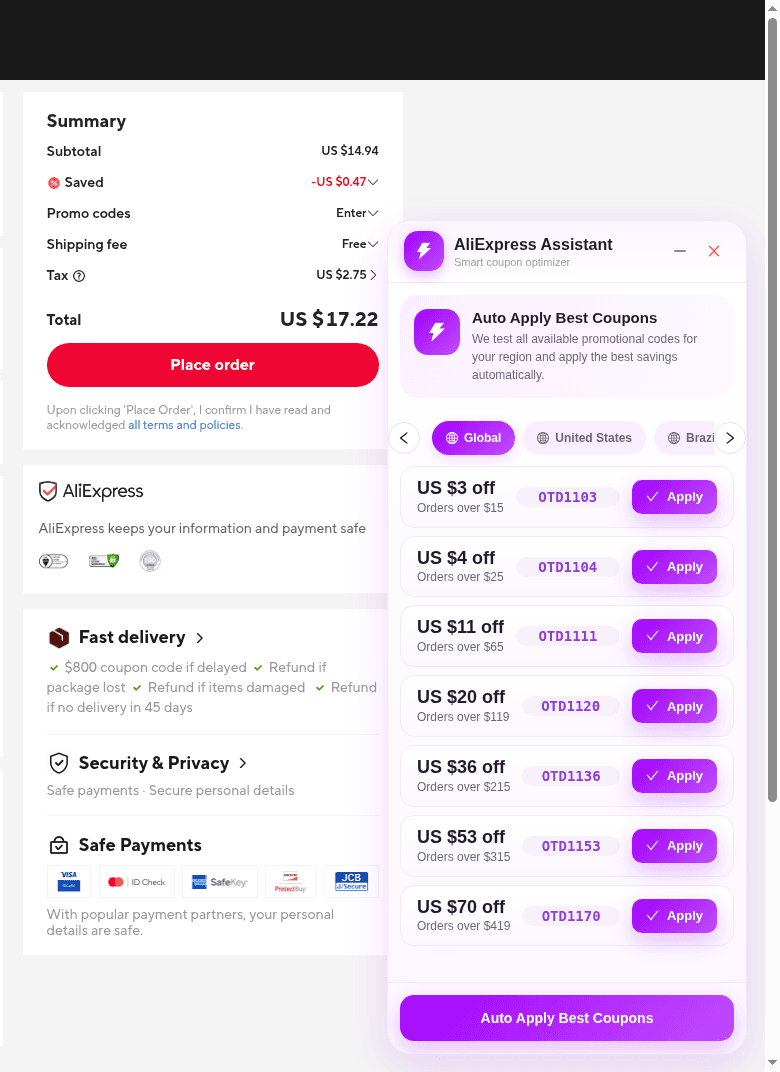
In the English 2026-11-14 capture, the Summary showed Subtotal US $14.94, Saved −US $0.47, a Promo codes Enter control, Shipping fee Free, Tax US $2.75, and Total US $17.22. Those numbers are a snapshot of one cart, not a live quote and not a recommended tax rate. Two shopper lessons still hold:
- The couponed or discounted merchandise line is not the Total. In that capture, Tax alone was larger than Saved, and the Total was higher than the Subtotal.
- The line is labeled Tax. This article does not relabel it as a CBP duty, a merchandise-processing fee, or a state sales tax. If your live Summary shows Tax, import charges, duties, or no such line at all, read what is actually there—and remember AliExpress may not be the party that later collects customs.
Official AliExpress Coupons Terms & Conditions (updated 2026-09-07) also keep taxes and duties out of coupon math. A coupon's minimum spend is calculated on a qualifying merchandise amount that excludes shipping, taxes, and duties, and coupon-specific terms still apply. A Tax line does not help you clear an "orders over" threshold, and a strong promo code does not cancel a later carrier collection.
What ElkTop does—and what it does not calculate
ElkTop 2.1.1 is a coupon companion, not a customs estimator. Keeping those jobs separate prevents a "best available price" message from being misread as "this Total includes every import charge you will ever pay."
- AliExpress product pages have no ElkTop coupon overlay. Native list prices, Welcome deals, or coins hints are AliExpress UI, not a landed-cost quote.
- The toolbar popup on an AliExpress tab is AliExpress Coins (Total Coins, Coin Value, Recent Records). It is not a duty calculator and not the place to Apply checkout promo codes.
- Apply and Auto Apply Best Coupons appear only on AliExpress confirm order (`/p/trade/confirm.html`). Prefer the United States region tab when it appears, then read the Summary.
- On supported sites such as DHgate, ElkTop shows Smart Coupons with Copy—not Auto Apply. Paste into the merchant's field and verify that merchant's own total the same way: merchandise, shipping, tax or import charges if shown, and the amount you will pay.
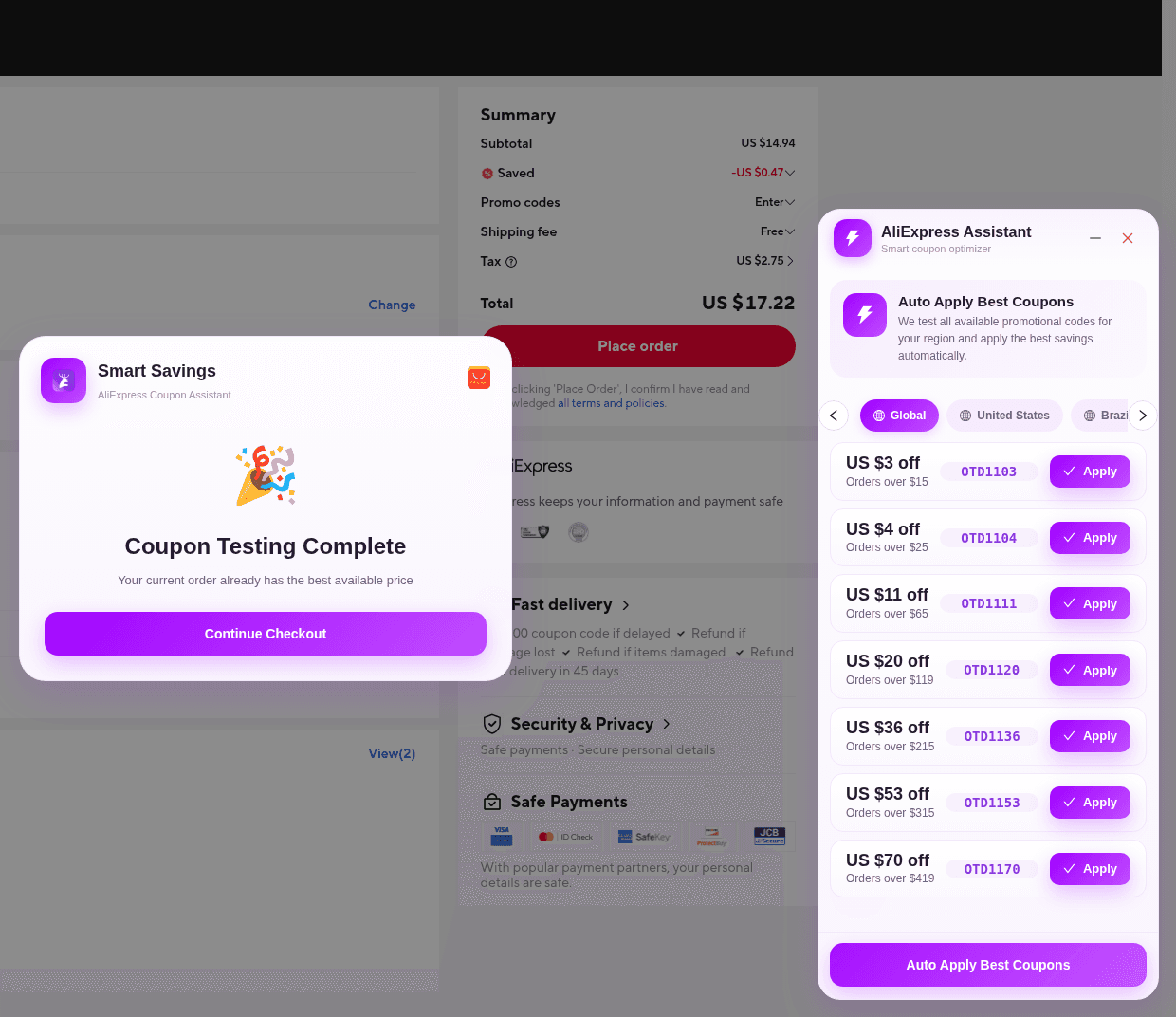
After Auto Apply, Smart Savings / AliExpress Coupon Assistant can show Coupon Testing Complete and Your current order already has the best available price, then Continue Checkout. In the 2026-11-14 capture, that modal sat in front of a Summary that still showed Tax and a Total higher than the merchandise subtotal. "Best available price" means further tested codes did not beat the current promotional total. Continue Checkout closes the ElkTop modal; it is not a payment instruction and not a customs clearance.
A practical U.S. checkout check
- Set AliExpress ship-to to the United States address you will actually use, and confirm whether the listing ships from overseas or from a domestic warehouse.
- Build the cart you intend to buy. Compare a coupon's minimum to qualifying merchandise, not to shipping or tax.
- Open confirm order (`/p/trade/confirm.html`) with ElkTop 2.1.1 enabled. Use Apply or Auto Apply Best Coupons there, then dismiss Smart Savings if it appears.
- Read the English Summary: Subtotal, Saved or coupon line, shipping, Tax or any import-charge line, and Total.
- If no tax or import line appears, do not assume the parcel is duty-free. Check official AliExpress help and, when needed, the seller or CBP's public guidance—not an old $800-threshold blog post.
- On DHgate or another supported site, use Smart Coupons + Copy, then verify that site's own checkout the same way.
- Pay only when you accept the Total you can see and the possibility of a later carrier collection if customs was not settled at checkout. This checklist is not an instruction to place an order.
For the AliExpress click path, use How to Use ElkTop on AliExpress Checkout. For why Auto Apply is missing on a product page, use Why ElkTop Auto Apply Works Only at AliExpress Checkout. For U.S. promo-code pitfalls, use AliExpress Promo Codes for US Shoppers. For ship-to eligibility, use Why AliExpress Coupons Depend on Your Delivery Region. Start any of those workflows with the same landed-cost question: after the coupon, what will this parcel actually cost to receive in the United States?
Sources
- CBP, "CBP modernizes low-value shipment processing" (June 24, 2026) — indefinite suspension of duty-free de minimis for imports valued at $800 or less; EO effective date as stated by CBP
- CBP, E-Commerce Frequently Asked Questions (last modified November 6, 2026) — all-mode scope, all countries and merchandise unless separately excepted; duties and fees based on HTSUS, origin, and value; gift and traveler exemptions
- Federal Register interim final rule 2026-12670 (91 FR 37789, June 24, 2026) — non-postal modes; effective June 24, 2026
- Federal Register interim final rule 2026-12669 (91 FR 37801, June 24, 2026) — postal network; de minimis suspension effective June 24, 2026
- AliExpress Help Center, "Do I need to pay for customs duties and import taxes?" — duties and taxes typically not in item price or shipping; never covered by AliExpress; usually collected by the shipping company on delivery; domestic-warehouse exception
- AliExpress Coupons Terms & Conditions (updated 2026-09-07) — qualifying merchandise amount for coupon minimums excludes shipping, taxes, and duties
Install ElkTop 2.1.1 from the Chrome Web Store, open a low-stakes AliExpress confirm-order page with your real U.S. ship-to, and practice the habit this guide is for: run Apply or Auto Apply Best Coupons, then read Saved, Tax or import charges, shipping, and Total before you pay. A coupon is only one line in that math.
Install ElkTop
Free on the Chrome Web Store—find and apply AliExpress coupons while you shop.