Guides · 8 min read
Prepare for AliExpress Sale Events Without Fake Deal Calendars
A practical sale-prep checklist for AliExpress: short wishlist, ElkTop ready for checkout Auto Apply, landed-cost math, and Summary verification—plus how DHgate Smart Coupons + Copy differs—without invented sale dates or live codes.
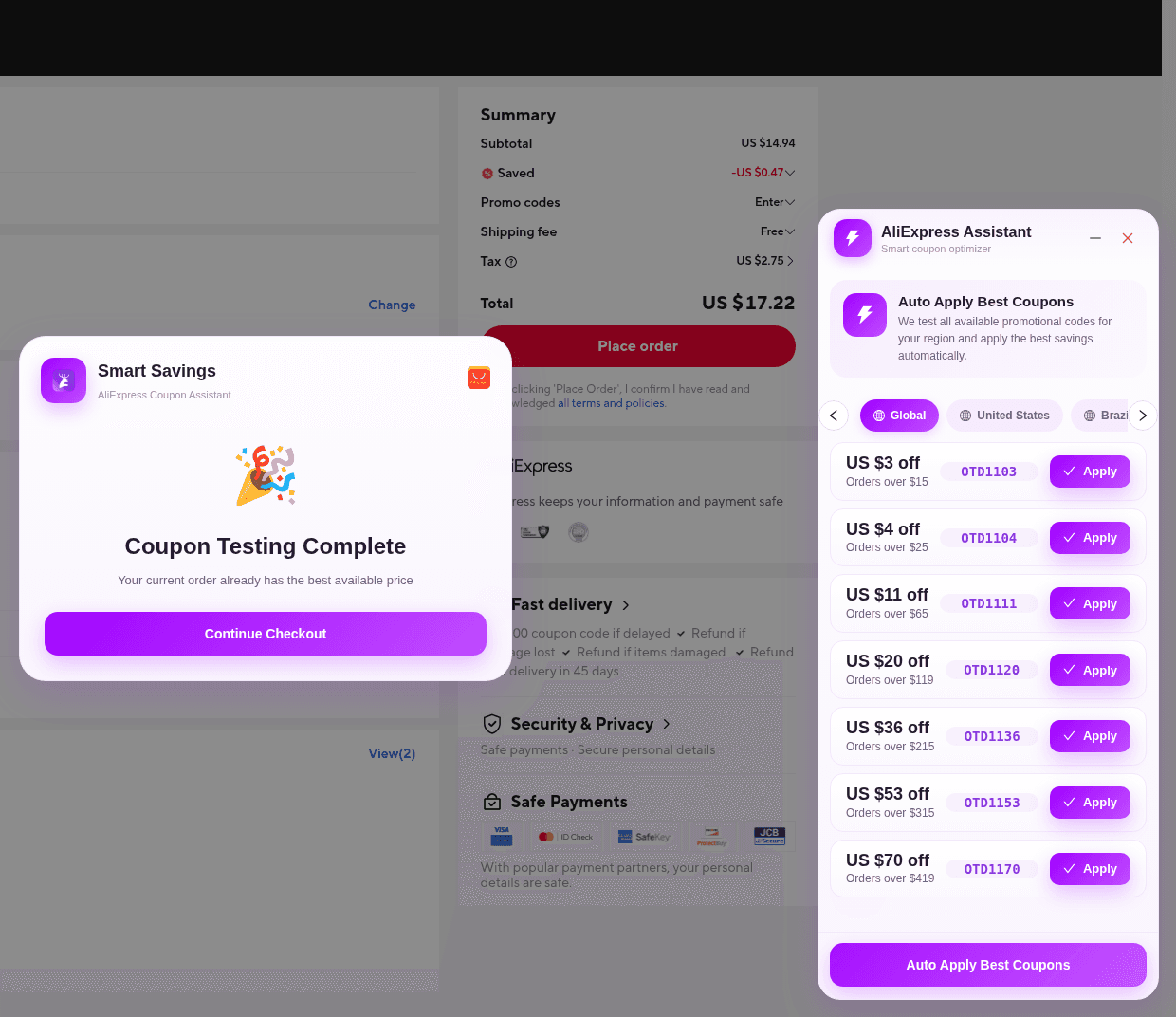
Major AliExpress shopping moments—seasonal campaigns, platform-wide sale windows, and category push events—reward preparation more than panic. Countdown banners and overlapping coupons make it easy to buy the wrong variant or trust a headline that checkout will not honor. This guide is a prep checklist you can control: wishlist hygiene, browser and ElkTop readiness, landed-cost comparisons, and confirm-order verification. It does not invent year-specific start times, live promo codes, or guaranteed savings percentages.
Why preparation beats impulse during sale spikes
- Popular SKUs sell out; knowing your exact variant ahead of time avoids panic substitutions.
- You can compare a sale Total to a normal-day baseline you already noted.
- ElkTop and Chrome are ready, so you are not installing extensions under countdown pressure.
- You leave buffer for shipping delays that often accompany high-volume periods.
Build a short wishlist before the rush
Start focused—not a sprawling board of every tempting gadget. For each item, save the product link, preferred options, and one backup seller if stock looks thin.
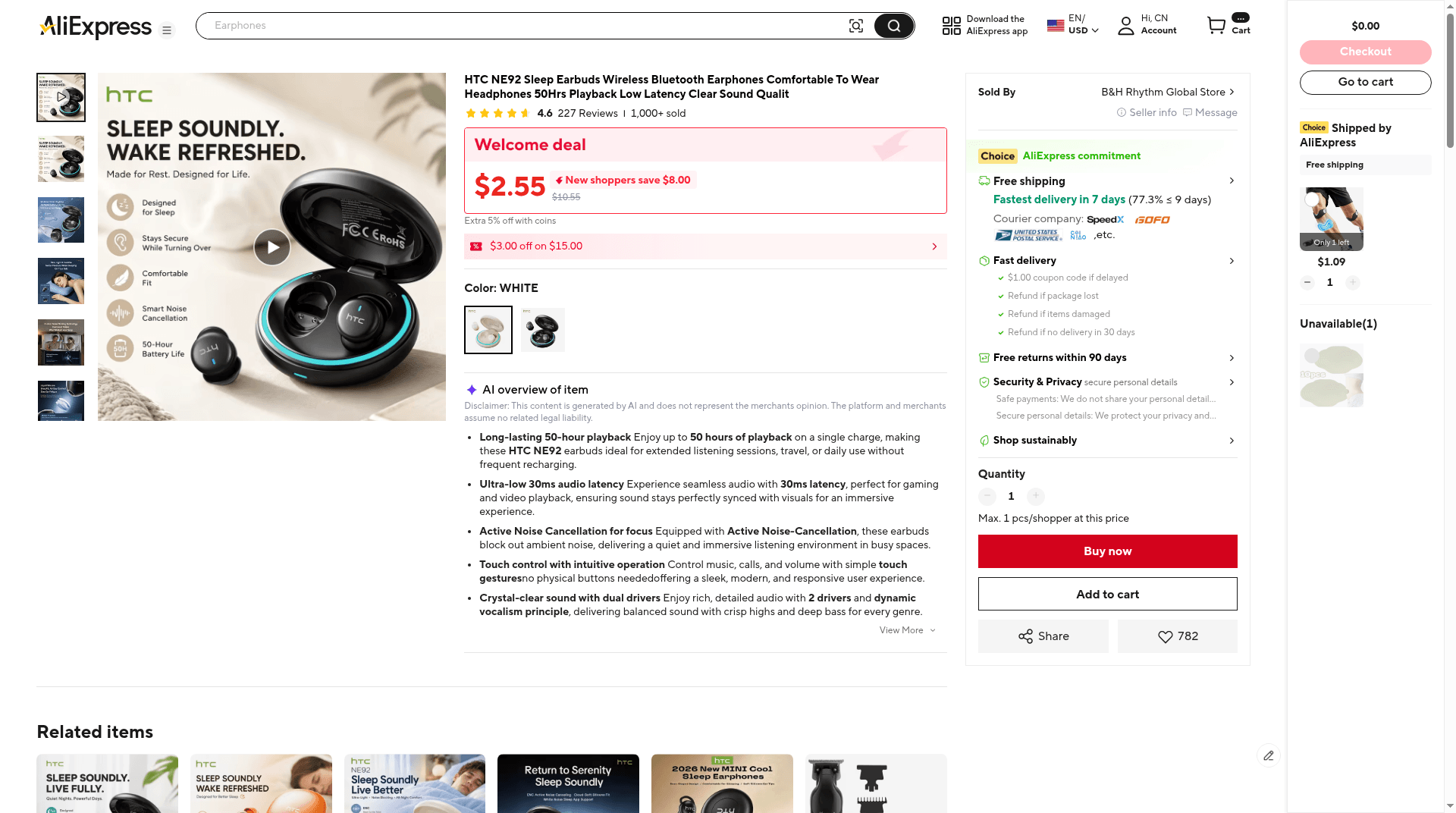
- Write what you actually need or gift, with a ceiling for landed cost (item + shipping + fees).
- On each listing, note seller name, shipping method cues, and today’s price—without treating that note as a later “was” marketing claim.
- Remember: ElkTop does not inject a coupon panel on the product page, so prep is about the listing itself.
- Remove nice-to-haves that would crowd your attention when the event is live.
- Flag gifts with hard arrival dates that cannot tolerate slow shipping even if a coupon looks strong.
Get Chrome and ElkTop ready (checkout, not product overlay)
Sale day is a poor moment to discover the wrong Chrome profile, a disabled extension, or outdated browser. Do the boring setup early—and install only from the official Chrome Web Store listing (extension ID pgeibfelcomlphhgnkihiibnhpadaddc), not an unpacked or Developer-mode load.
- Install ElkTop from the official Chrome Web Store and pin the purple elk icon.
- Confirm it is enabled on the profile you will use (this guide’s live UI captures are from store-installed 2.1.1).
- Log into the AliExpress account and set ship-to to your real destination.
- Update address and payment details you are comfortable using—without storing secrets in shared notes.
- Smoke-test the right surface: open a low-stakes cart to the confirm-order page and confirm AliExpress Assistant appears—not that a coupon tray shows on a random product page.
ElkTop’s sale-day job matches any other day: on AliExpress confirm order, offer Apply and Auto Apply Best Coupons; in the toolbar on AliExpress tabs, show AliExpress Coins; on other supported sites, show Smart Coupons with Copy. It does not freeze inventory or override campaign rules.
Compare landed costs to US alternatives
- Add merchandise, shipping, and any fee estimates shown at checkout.
- Price time: if a gift must arrive by a hard date, a slower “bargain” may not be a bargain.
- Weigh return friction for overseas sellers versus domestic options.
- Watch category risk (batteries, liquids, branded electronics) where shipping or customs complicate delivery.
- If a domestic price is close after shipping, prefer the option that matches your timeline and support needs.
If you also shop DHgate: Copy is not Auto Apply
Some shoppers bounce between AliExpress and other marketplaces during the same seasonal window. On DHgate, ElkTop’s Smart Coupons panel can list dozens of available discounts with Coupon Codes cards and a purple Copy button. That is a manual paste workflow into DHgate’s own field—not the AliExpress Assistant Auto Apply path.
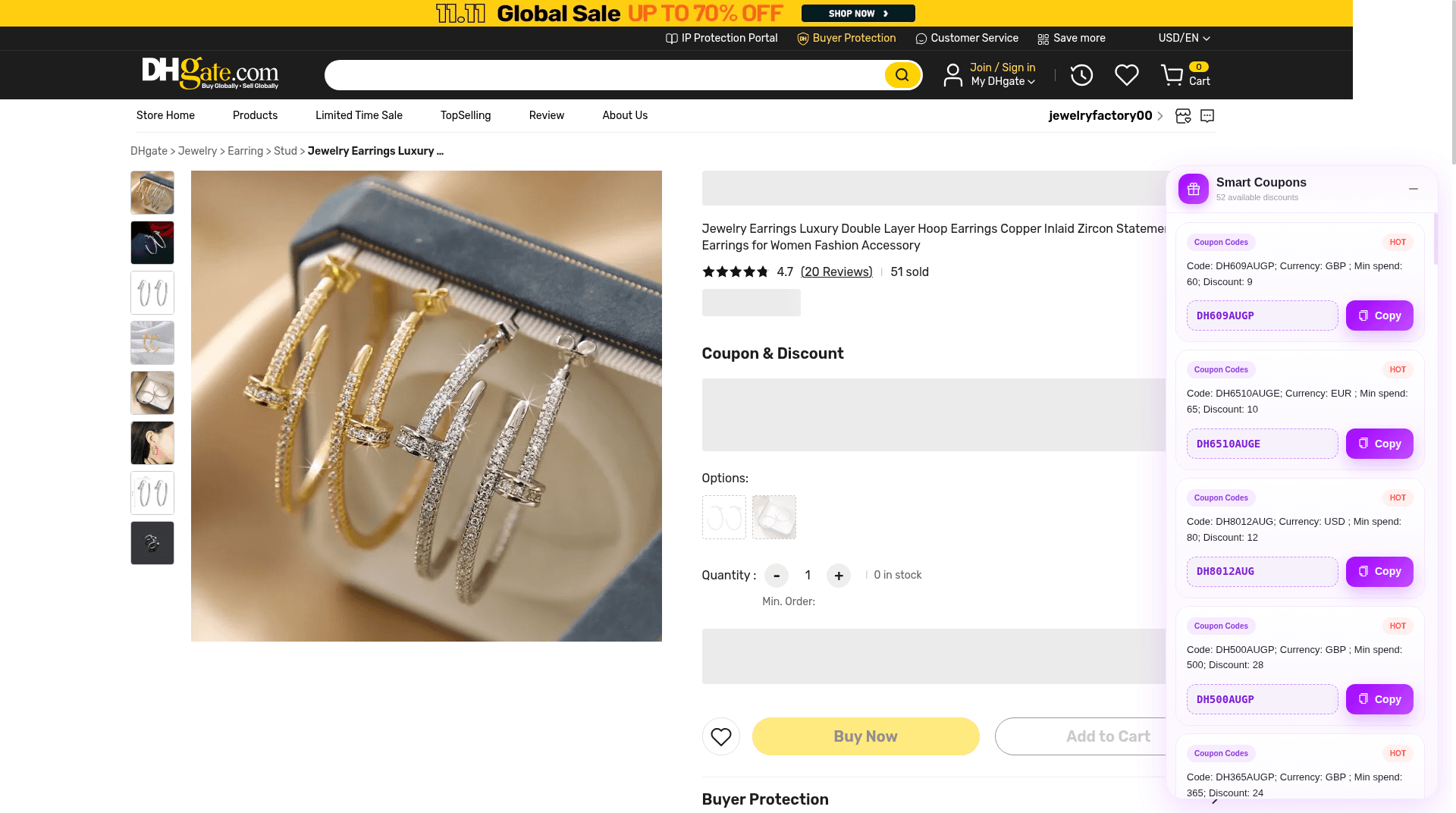
Codes visible in the 2026-11-14 capture (for example DH8012AUG with a USD min spend, or GBP/EUR variants) illustrate currency-specific rules. Copy only what matches your cart currency and total, then verify on the merchant checkout. Do not assume AliExpress Auto Apply behavior on DHgate.
During the event: Apply or Auto Apply, then verify
When the campaign you care about is live on AliExpress, work from your wishlist. Open the saved listing, confirm the variant and shipping method, go to confirm order, and use AliExpress Assistant.
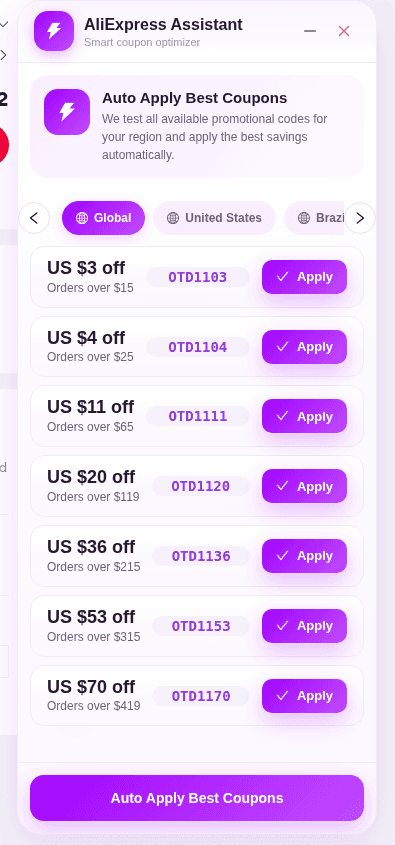
- Confirm product options still match what you saved—bundles can change during events.
- Use Apply on a single code or Auto Apply Best Coupons for a region pass (Global / United States / others as shown).
- Read Smart Savings when it appears (for example Coupon Testing Complete / best available price), then Continue Checkout to return to AliExpress UI.
- Reconcile Saved, shipping, tax, and Total on the AliExpress Summary before you consider paying.
- If the discount is missing or smaller than expected, check exclusions and minimums—or skip the coupon.
- Do not treat this checklist as an instruction to place an order; stop when the math is wrong.
Verification matters more during sales because marketing language can imply stacking that checkout will not honor. Trust the Summary, not the badge on the product card.
Watch for stockouts and listing churn
- Keep backup sellers for the same item type.
- Re-read shipping estimates after a restock—methods and ETAs can change.
- Be skeptical of brand-new listings with thin review history that appear overnight.
- Avoid panic bulk-buying “just in case”; minimums can push you into wasteful carts.
- If a coupon needs a higher cart total, add only items you already planned.
Calm pre-sale checklist
- Confirm the event’s live dates and eligible categories on AliExpress—not from memory or an old blog post.
- Finalize a short wishlist with baselines for price and shipping.
- Install and pin ElkTop; smoke-test AliExpress Assistant on confirm order.
- Set ship-to, address, and payment readiness on the correct account.
- Decide your maximum landed cost and latest acceptable delivery window.
- On sale day: Apply or Auto Apply at checkout, verify the Summary, and stop when the math is wrong.
Sale events reward shoppers who treat them as logistics with optional coupons—not as a scavenger hunt for secret codes. Prepare the list, prepare the browser, compare full cost to buying in the US, and let checkout—not a countdown timer—make the final call.
Get ElkTop installed from the Chrome Web Store before the next AliExpress campaign you care about. When the live event page says the sale is on, you can focus on your wishlist, run Auto Apply Best Coupons at confirm order, and verify every total before you pay.
Install ElkTop
Free on the Chrome Web Store—find and apply AliExpress coupons while you shop.